Thursday, August 9, 2007
Live free or die
That's the official motto of the great state of New Hampshire. It can also be applied to software or should we say "freeware". I do find that many name brand software giants tend to have bloated software that can be resource hogs. Freeware utilities tend to be more focused and less bloated. many can be found at sites like FileHippo, Majorgeeks, Download.com and many more. PC Magazine put together an interesting list and guide for free(has a nice ring to it doesn't it?) software to help sort out what to choose from multitude of choice's. I hope it helps.


Re: Upcoming Projects
For those of you keeping track I did two of these already and maybe your anticipating adding a hard drive to my wife's laptop. Granted it's not quite up there with the iPhone or the latest Potter book/movie. Well when I purchased the other 20gb drive I bought two from the same person on Ebay. Unfortunately one was a bad drive. Since the drive was bought as-is I have little recourse. Her laptop will have to wait. As much as I like Ebay I'm not crazy about purchasing computer equipment from them. Unless the sellers got a warranty you've got little choice if something goes wrong. When doing computer work for other's I prefer a vendor/reseller like NewEgg where if something goes wrong you've got someone to turn to. Not to mention NewEgg's shipping price and speed usually beats anyone on Ebay. That's just my two cents.
Tuesday, August 7, 2007
Clone Wars

Now I'm on to the next project with my friend's Dell Latitude C600. Having received the new 60gb drive it's time to clone the drive. Being on a budget I'm going with a freeware cloning software called XXClone. I've used it a couple of times before and had success so hopefully all will go well this time(probably just cursed myself). As of right now I've already cloned the drive and now I'm ready to make the switch. Also I'm using Xtatix Portadrive(purchased from NewEgg) to hook up the drive to the laptop.
First I shutdown the laptop. Remove the PortaDrive cable with the new drive. I then proceed to remove the existing 20gb drive. It's located on the left hand side. I remove one small phillips head screw. Carefully remove the drive by gently but firmly pulling on it. I notice I have to remove an adapter on the pin end of it. This I had to be careful with because it tended to pull to one side and bend the pins. Then after that I unscrewed the adapter cover on the other end again using a small phillips screwdriver. Then I proceeded to reassembly in reverse order. After reassembly I turned the machine happy to see the Windows splash screen then to the desktop. Success!
Monday, August 6, 2007
Free Laptop?

I'm sure many of us have seen these either in our email or advertisement. The usual line is that you'll receive a new laptop(doesn't matter brand) all you have to do complete the sponsors deals. In my case I heard of one advertised on the radio I can't remember the name of it now but there are many of them around that do same thing. I'm usually pretty skeptical about stuff like this but, for some reason I thought maybe this would be different since it was on the radio maybe it legit or different in some way. Boy was I wrong. At first you go to the given website and it says all you had to do was fill out or sign up for some deals from there sponsors. The items are usually from reputable advertisers so it doesn't seem like such a risk. They seem to do this in steps. At first they seem cheap and no big deal. Some are free or only cost a couple of dollars. Then you go to the next page and there are more things to sign up for. If you notice the initial costs are slightly more. Fill out a few more things and then go to the next page. More sponsor pages requiring filling out and more memberships. Like before the prices go up. You get to the point that you lose track of who and what you've signed up for. It was late at night and my defense were down so some how I probably got through at least three pages or so before I decided I had enough. At that point I thought what about this is free? If you add up all the memberships(all have monthly fees) you'd probably be paying more than if you went out and bought a laptop elsewhere. As much as you try and remember what you signed up for your bound have a couple slip by. I did a couple of weeks later I noticed an extra charge in my account. I quickly gave a call and they did eventually refund my money. Just this past week(little over a month later) a $69.95 charge was taken out of my account. Unfortunately not aware this was coming out my account had insufficient fund it at first refused then they did it again the next day(still insufficient funds) and now I get socked for $25 from my bank. So now my account's down $94.95 before I even know it. When I did see I called them (furious trying to hold my temper) they say they are going to refund my money. I'm currently still waiting for that to happen. I'm still out $25 from the bank though. Thankfully this was just a secondary account not our main house account where the damage could have been worse.Worst thing is I've got no one to blame but myself for falling for this stupid marketing scheme. A word of advise is that if you see something like this advertised delete it or ignore it.
Thursday, August 2, 2007
Changing the CMOS battery(laptop)
Recently a friend got an IBM Thinkpad 600E laptop. On boot up he would get an error 00161 and 00163 and would freeze. On researching the error code I found that this had to to with the CMOS battery being dead. I located a battery from batteries.com. They have an excellent battery search so you can get the correct one for your application . The battery I needed was part no. CR2025-WR. Ok now that I received it it's time to change the battery.
1. Turn off the notebook and unplug it. Also I took out the battery pack on the bottom.
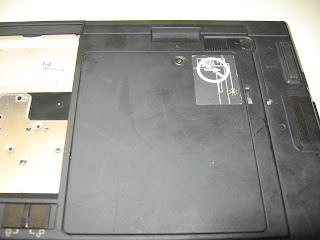 2. The CMOS battery is located in the same panel as the memory cards. In this case the panel is located under the CD drive. You'll need a small phillips screwdriver to undo the panel.
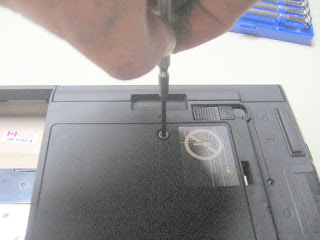 3. Once you've removed the panel the battery is located close to the front of the notebook under a tab and you'll see the battery tucked underneath with a black and red wire plugged the board. Unplug the wires from the board. Then press down on the tab where the battery is and pull out the old one.
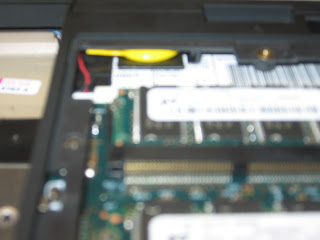
4. Connect up the new battery and plug it back in and replace the panel in reverse order.
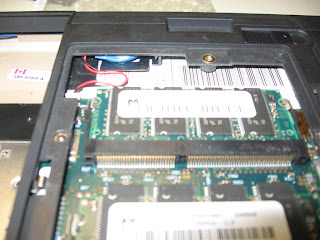
Your done. Once you've booted back up you'll be prompted to reset the time and date. You should be good to go after this.
1. Turn off the notebook and unplug it. Also I took out the battery pack on the bottom.
 2. The CMOS battery is located in the same panel as the memory cards. In this case the panel is located under the CD drive. You'll need a small phillips screwdriver to undo the panel.
 3. Once you've removed the panel the battery is located close to the front of the notebook under a tab and you'll see the battery tucked underneath with a black and red wire plugged the board. Unplug the wires from the board. Then press down on the tab where the battery is and pull out the old one.
4. Connect up the new battery and plug it back in and replace the panel in reverse order.

Your done. Once you've booted back up you'll be prompted to reset the time and date. You should be good to go after this.
Wednesday, August 1, 2007
Free Anti-Virus Scanners
Are you looking for a free anti-malware protection (such as: spyware, viruses, worms, trojan horses, botnets, etc.) for your computer? There are several options available for you to choose from, you need to find the one that works best for you.
read more | digg story
read more | digg story
Subscribe to:
Posts (Atom)