Showing posts with label ubuntu. Show all posts

Friday, January 2, 2009

Learning Linux

In my upcoming adventures with Free Geek Providence I’ll be encountering the Tux operating system installation of a Linux based Xubuntu. To be honest I’ve only touched upon Linux as far as usability and real world testing.

I have tried some of the more popular ones like Ubuntu, Kubuntu. Xubuntu, Puppy Linux and Backtrack. Some have more of a learning curve than others. For someone used to a windows environment it can be intimidating. Terms such as KDE, Gnome, terminal server, command line, can be baffling to the new person(as they are to me to be honest). My goal is to try and weed through the jargon and understand Linux better.

I’ll be back with more about Learning Linux.

Thursday, December 18, 2008

Ubuntu Guide from PC World


Here is an excellent guide from PC World on how to install the latest release of Ubuntu Linux. It can still be a little intimidating for the uninitiated to install a Linux software. They have made it a bit simpler. A guide is nice to have.

Saturday, November 15, 2008

Upgrade: Ubuntu 8.04 to 8.10


This one is for those Linux fans out there. I made the plunge and decided to upgrade my Linux PC from Ubuntu 8.04 (Hardy Heron) to 8.10(Intrepid Ibex, where they get these names I'm not sure). I run my Ubuntu on an older Pentium III Compaq for the sake of trying out Linux. In truth I don't use it a whole lot but it is useful and it kills time some days. I'm not going to get super detailed step by step instruction but, maybe just share my thoughts and experience with it.

My first recommendation is to visit the Ubuntu website which has instructions on getting you started. One of the first things they recommend is to make sure your current version 8.04 is up to date. So you go to the Update Manager by going to the System->Administration->Update Manager.
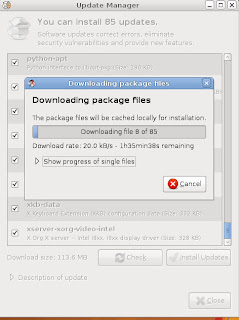

I click Check button and find out I have 85 updates to do. Like I said I haven't used this in awhile so I got behind a bit. Yours may actually vary. So I click Install Updates and begin the process.
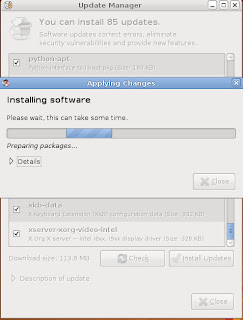
They aren't kidding when they say "Please wait, this can take some time".
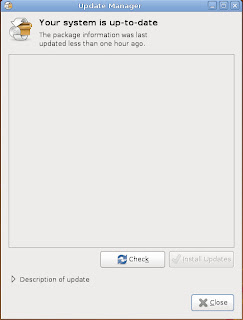
This is what it should look like when your done updating. It does take some time so don't be in a rush.
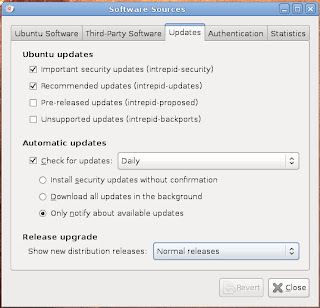

Now you have to tell Ubuntu what type of upgrade to look for. You go to System, then Administration and then to Software Sources. When the window comes up go to the Updates tab. Where it says Release upgrade select Normal releases.
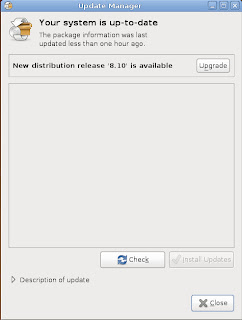

Now you go back to the Update Manager and now it will say New Distribution release "8.10" is available. Click on Check and the process will start.
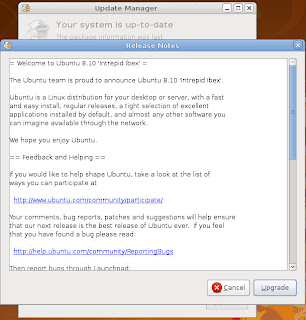

You'll get a window with some release notes. You'll then click on Upgrade.
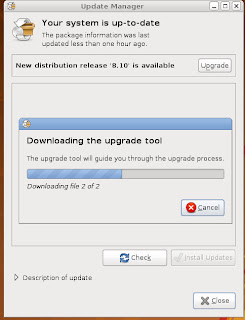

Now you'll be downloading the upgrade tool.
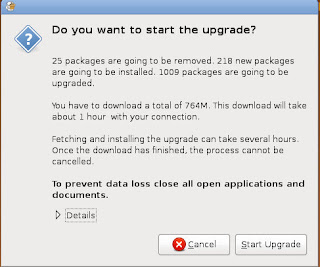


Now this seems like a silly question. Do you want to start the upgrade? Of course I do. Be for warned though put aside a great chunk of time before you start. Put an addition on the house or write that novel that you've always wanted to do. I am exaggerating but, don't expect do much on your computer for a few hours.
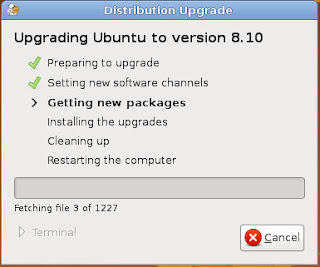


The process now begins. The download is an estimated 764mb so it will take awhile depending on your connection. If your on dial-up your in trouble. I'd get the CD somewhere before attempting this as it probably take days instead of hours I would imagine.
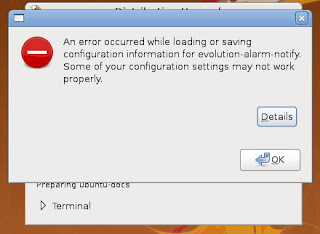


Of course you don't think this went without any glitches. I clicked ok and then got this message....
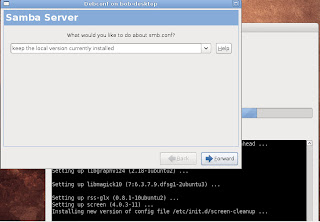


To be honest I don't even know what Samba Server does.I made note of this for troubleshooting later and the upgrade continued...
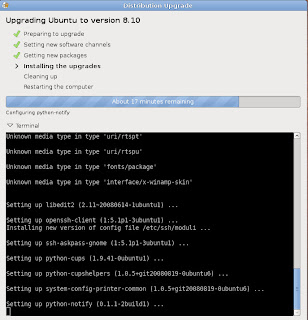


On to the next step...
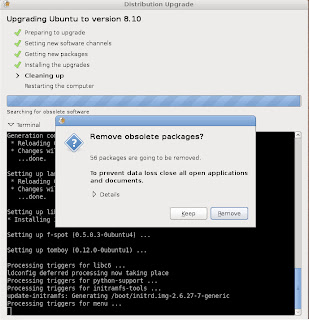


Not sure why we'd want to keep them. Perhaps as a backup in case something went awry. I decided to live dangerously and removed them.
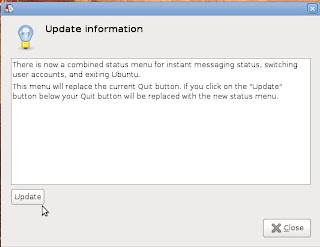
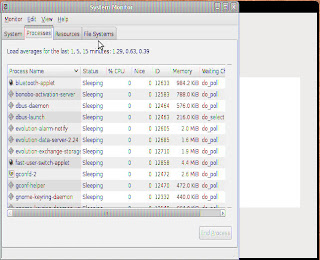
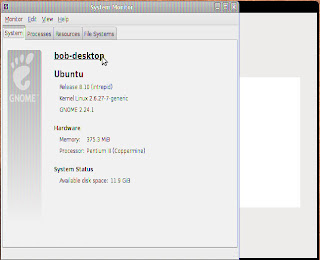


Now we see that I'm running Ubuntu 8.10.At some point the system reboots. I can't remember if it was automatic or I had to do it manually. It seems I have a graphics card or screen resolution problem. I'll troubleshoot that when I have some time. It went successfully though. I don't notice much difference. My text in the System Monitor comes in discolored though. It seems to some type of graphics problem. This is an older machine and may be struggling to keep up. Figuring out the problem will give me something to do when I have some free time (haha yeah right who am I kidding). Anyway like I hinted at before this does take a considerable amount of time. I believe it took me close 6 hours or so on broadband (cable) connection. It's not for the faint of heart. Good luck and I hope this is of some use to someone. Thanks and have a great day!

Friday, October 31, 2008

Upgrade From Ubuntu 8.04 to 8.10 - Part 1

This for those Ubuntu fans out there. Apparently Ubuntu has an update. This video from PCMech showing how to to upgrade from 8.04 to 8.10. I'll be giving it a try soon and I'll let you know what happens.

Thursday, September 4, 2008

Ubuntu wireless woes

A friend of mine was encouraging me to write about how I got my wireless card to work in Ubuntu. Unfortunately I didn't take notes and some of it was trial and error(lots of that). If I do it again I'll take some notes. I did find a few guides that were very helpful. One was through Ubuntu Documentation which gives an excellent tutorial on how to install and use Ndiswrapper to configure your wireless card. Another was through Ubuntuguide.org which had some excellent beginner stuff. I'm still enjoying Ubuntu and hope you do too!Good luck!

Tuesday, September 2, 2008

Exploring ubuntu


After using and exploring ubuntu 8.04 (Hardy Heron) the more I'm beginning to like it. I just thought I'd share a few thoughts on it here. The interface and usability has out shined my expectations of it. I'm getting used to using the command line for certain items though a lot has been automated by the shell(gui) which makes it less intimidating. Though I'm getting over my initial fear of using the command line. I've been playing catch up on Linux terminology. So far there hasn't been a whole lot I haven't been able to use as far a functions and features compared to Windows XP. Somethings are even easier. I like it so far enough to consider it for my next PC build as my OS of choice. For the price you pay ($0.00) it may be worth checking out.

On another note a friend of my is visiting with us let me explore his new Acer laptop with Windows Vista. He recently upgraded his memory and it now works blazingly fast (despite Vista being a resource hog). Some of the features are nice and seemed to work fine while I was using it. Worth upgrading from XP is debatable. Much of it was nice eye candy but worth the money to upgrade from XP is debatable

Sunday, August 31, 2008

Back to Ubuntu

A while back I fooled around with ubuntu (Linux OS) without much success. After installing another version(Backtrack 3) onto a friends laptop I decided to give it another try. I stuck with ubuntu because I was somewhat familiar with it and seemed most versatile. The biggest hangup I had was configuring my wireless internet to work with it. Being an internet junkie a computer without internet connection is like a car with no engine. It may look nice but it can't(at least not without pushing) go very far.

OF course as my luck would have my wireless card is not Linux friendly so I had to use the Linux program called ndiswrapper to use my Windows wifi card. Of course being relatively new to Linux I had to figure it out by scratch. By some trial and error I at last was connected to the world. I was a very happy camper as the saying goes. I now have a use for my old Compaq PC I've had lying around. So far I've found ubuntu very interesting. Perhaps I can piece together a how-to out of it(wireless hookup) soon if I can remember how I did it. Anyway back to exploring ubuntu...

Tuesday, August 14, 2007

More Ubuntu

So far I've been unsuccessful in getting this online. My usb wireless network adapter(D-Link DWL-122) is a pain to try get to work under Linux. Though the operating system seems ok and runs well on the Compaq EN not being able get online has bugged me. I'm an internet junkie and getting online is important to me as it would be to other's. I've pretty much given up on the adapter I have and I've begun to look at purchasing one that would be a bit simpler(and possible) to set up. The other choice would be to hard wire through my router which would be a pain to set up in my case. I haven't given up just yet. I won't give in to the penguin just yet.

Saturday, August 11, 2007

To Ubuntu or not to Ubuntu?


Well I installed Ubuntu Linux 7.04 on my Compaq EN that I had lying around. It's my first foray into open-source operating system. I down loaded the program(an ISO image) and burned it on a CD. The actual installation was pretty painless. The only early glitch so far is that sound comes out of the system speaker and not the plugged in speakers in the back. I also had a stuck CD when it was finished installing. I'll be fiddling with it at a later time as it's a late in the morning and I do have my regular job to attend to later today. Later.